Ad operations · Change tracking
Google Ads change history: what it shows, and what it quietly hides
Google Ads change history covers the past 2 years in the interface. The API behind every tool returns 30 days, capped at 10,000 rows, and Google says it may not include every row the interface shows. What you can read and what you can sync are two different things.
Change history is the most useful screen in Google Ads that nobody opens.
Change history answers the question every account eventually asks: what did we actually do, and when?
Then you try to get it out of the platform and into anything else: a spreadsheet, a report, a dashboard, an AI. And you discover it isn't one feature. It's two, with very different rules, and the difference is the whole story.
What does Google Ads change history actually show?
In the interface, change history lists edits made to your account, campaigns and ad groups over the past 2 years. Each row carries a date and time, who made the change, what was changed, and the previous and new value. You can filter by date, by user and by change type, and download what you're looking at.
Change history covers more than most people expect: budgets, bids and bid strategies, status changes, targeting, keywords, ad creation and removal, audience edits, and network settings.
Change history does not cover everything. Conversion tracking configuration, billing changes and some account-level settings live elsewhere. And a change Google itself made on your behalf may be recorded differently from one you made by hand.
For one account, on a laptop, that's plenty. The trouble starts the moment you want it somewhere else.
Or see what your team should look at first: the Paid Media Capacity Check, being built nowWhy can't a tool see more than 30 days of change history?
Because the interface and the API are not reading from the same window. Any tool, script or AI that syncs your change history uses the Google Ads API's change_event resource. That resource is restricted to the last 30 days, and the query is capped at 10,000 rows. The 2-year view is a human-only privilege.
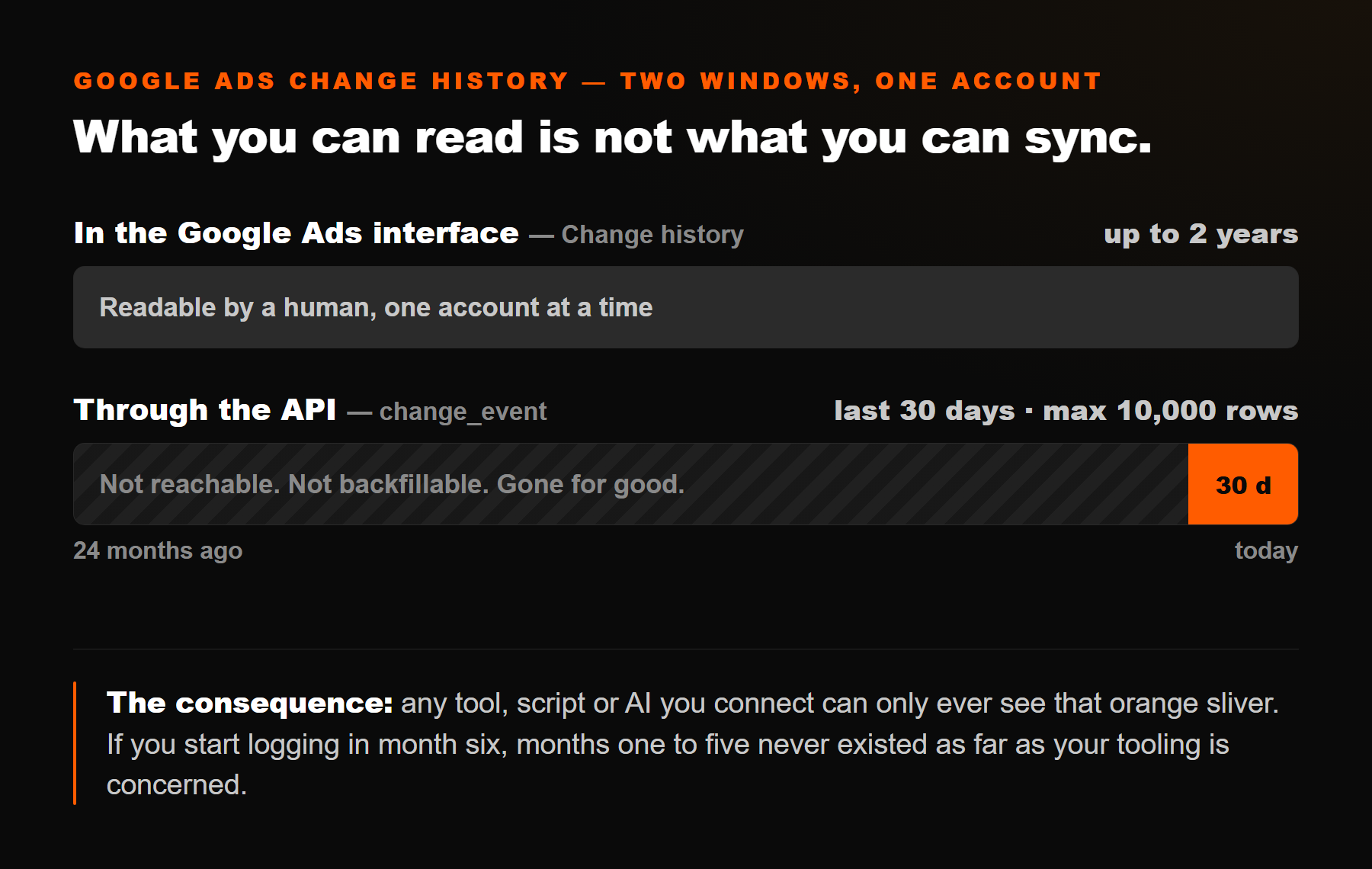
Two consequences that catch people out:
- There is no backfill. If you start syncing change history today, last quarter does not arrive later. It is outside the window forever, even though you can still read it by hand for up to 2 years. This is the single most expensive thing to learn late. It has a dated example this year. The AI Max auto-upgrade in September 2026 runs all month, and by November the API can no longer reach it.
- The API set is not guaranteed to match the interface. Google is explicit about this, and it matters if you're about to show a client a list and call it complete.
“A change event may not include every row from the Change History in the web client.”
“Not all changes to your account will have a corresponding change event entry.”
Google Ads API documentation, Change Event (retrieved 28 July 2026)
There's also a smaller detail worth knowing before you debug something that isn't broken: a change can take up to three minutes to appear. If you make an edit and immediately query for it, an empty result is normal.
That habit of leaving something out without saying so is not limited to the change log. Google's reporting drops the row entirely when every selected metric is zero, which is why Google Ads missing data and a genuine zero arrive looking the same.
Or see what your team should look at first: the Paid Media Capacity Check, being built nowWhere should your change record actually live?
There are four places a change record can exist, and they fail in different ways. This is the table I wish someone had shown me before I built anything.
| Where | How far back | What you get | Where it breaks | Best for |
|---|---|---|---|---|
| Google Ads interface | Up to 2 years | Full rows with user, old and new value, filters, manual download | One account at a time, manual, nothing scheduled, no link to performance | Answering "who touched this?" after the fact. The most complete record you have |
Google Ads API (change_event) |
Last 30 days only | Structured rows, changed fields, old and new values, client type, 10,000-row cap | No backfill, may omit rows the interface shows, needs API access | Automation. The only option that can run on a schedule |
| A synced tool or dashboard | From the day you switch it on | Change rows next to performance, searchable, cross-account | Inherits every API limit above, plus whatever it fails to reconcile against your metrics | Spotting "something changed here" while reviewing performance |
| Your own one-line log | Forever | The reasoning: why you did it, what you expected, when to check | Only as good as your discipline; records intent, not the literal edit | Judging whether the decision was right. Nothing else captures this at all |
The last row is the one people skip, and it's the only one that holds the information the platform will never have. Google records that a budget went from 40 to 65. It has no idea what you expected to happen, so it can't tell you later whether you were right.
Or see what your team should look at first: the Paid Media Capacity Check, being built nowWhat does a change log look like when it's built badly?
I know, because I built one badly first.
I'm building an open-source console that reads my Meta and Google data and proposes what to do about it, and change history was one of the first things I imported. The first import produced four rows. All four said, near enough, the same sentence: targeting changed on campaign. Same generic entity name. No previous value, no new value. All on the same date, and because I was formatting by date only, they rendered as four identical lines.
Four rows of nothing, from an import that returned HTTP 200.
The lesson wasn't about my code. It was this: a change log is only as useful as its three least glamorous fields.
- A real entity name. "Google Ads campaign" is a placeholder, not an answer. If you can't say which campaign, the row is decoration. I ended up rejecting generic placeholders explicitly and labelling them "unidentified campaign", because an honest gap beats a confident-looking blank.
- Old value and new value. "Budget changed" is trivia. "Budget 40 → 65" is evidence. For newly created things there is no old value at all, because the API returns new values only. So a blank before on a creation is correct behaviour, not a bug. Show it as such.
- A time, not just a date. Half a dozen edits on one afternoon collapse into indistinguishable rows without it. Adding the hour was a two-character fix that made the screen readable.
If you're evaluating a reporting tool, this is a fast test. Ask it to show you a week of changes. If the rows don't name the campaign and don't show before and after, it is reading the API but not telling you anything.
Or see what your team should look at first: the Paid Media Capacity Check, being built nowWhy is "what did that change do?" harder than it looks?
Here's the part that cost me real days, and it's the reason I'd tell anyone to be sceptical of a tool that claims to show the impact of a change.
Lining a change up against performance sounds like a join. Take the change, take the daily numbers for that campaign, compare the window before against the window after. Simple.
That join didn't work. Every change sat at "measuring" forever, with zeros on both sides, while the campaigns involved plainly had spend and conversions.
The obvious diagnosis was wrong
The obvious diagnosis was stale data. It was wrong. The performance data was fresh and the nightly job was fine. The actual cause: the same campaign arrived under two different identifiers in two different imports. The reference attached to the change event and the reference attached to the daily performance series didn't match, so the join returned no rows, silently, forever. Nothing errored. It just quietly reported nothing, which is the worst failure mode there is.
The fix was to reconcile the two: match on candidate references first, then fall back to a normalised campaign name. Boring. Took far longer to find than to write.
The general lesson generalises well beyond my console: when two systems describe the same object, do not assume their identifiers agree. And when a metric reads zero, find out whether it means "no effect" or "no rows". Those are opposite conclusions and they look identical on screen.
Or see what your team should look at first: the Paid Media Capacity Check, being built nowHow do you pull your own change history?
If you have API access, this is the query. It's the same shape I use, and it's yours, no email required.
Google Ads Query Language: last 14 days of changes
Three things that will save you an afternoon
Three things that will save you an afternoon. The date filter is required and has to sit inside the last 30 days. If a wider range throws an error, that's why: narrow it, or use explicit BETWEEN '2026-07-14' AND '2026-07-28' dates. The LIMIT is also required, and 10,000 is the ceiling. And if you need more than 10,000 rows, note the timestamp of the last row you got and start the next query just after it. The query also survived the Google Ads API v22 sunset: on five accounts over four weeks, v22 and v25 returned the same number of changes.
client_type is the field most people ignore and shouldn't. It tells you whether an edit came from the web interface, the API, Google Ads Editor, a script, a bulk upload, an automated rule or an applied recommendation. That's how you separate what we did from what the platform did to us. On accounts running automation, that distinction is most of the value.
The other half, the one no API will do for you
And here's the other half, the one no API will give you. One line, written when you make the change:
The log line the platform can't keep for you
The expect and check lines are the whole point, and they're the part I got wrong for years. A log that only records what you did lets you reconstruct a timeline. A log that records what you expected lets you find out whether you were any good at this. Only one of those changes how you decide next month.
What the one-line log buys you
The one-line log also converts the ugliest conversation in this job, why did performance drop?, from a memory exercise into a lookup. It is the same argument I made in you're deciding from memory. The looking back is the only job in ad ops with no owner, so it only happens if you make it cheap.
Or see what your team should look at first: the Paid Media Capacity Check, being built nowWhat I still don't know
Three honest gaps, because a page that pretends otherwise isn't worth much.
- I don't know how much the API omits. Google says it may not include every row the interface shows, without saying which rows or how often. So I won't tell you an API-sourced log is a complete audit trail. It's strong evidence with an unquantified gap, and the interface stays the tiebreaker.
- I don't know the right before-and-after window. I default to 14 days each side and label anything incomplete as provisional. Fourteen is a guess. For a low-volume account it's plainly too short. I've since settled on counting conversions instead of days, and the arithmetic for how many you need is in what is a good ROAS.
- A change log shows coincidence, not cause. A shift that lines up with an edit may be seasonality, an auction move, a competitor, or a platform definition change. The log tells you where to look. It never closes the argument, and any tool that says otherwise is overselling.
What I'd do differently, in one sentence
Start the record on day one. Two moves, about ten seconds each:
- Turn on whatever syncs it. The API window is thirty days and there is no backfill, so a record that starts in month six has no month one.
- Write the one-line log, with the expect and the check. It is the only half no platform can keep for you.
Not because a change log is exciting. It isn't. Because it's the only asset in this business that you cannot buy back later. Performance data waits for you. Change history doesn't: 30 days, then it's gone from anything but a human squinting at a screen.
Turn on whatever syncs it. Write the one-line log with the expect and the check. Both cost about ten seconds a change, and both stop being optional the first time someone asks you to prove what happened in March.
Related reading. Marketing attribution: a change log tells you when a setting moved; that one tells you what the setting does to the number. Marketing report template: where the log stops being a private note and becomes the block that answers the client. Export Google Ads data. Google Ads access levels: why a shared login makes every row of this log say the same name. What not to automate in your ad accounts: a change log only records, which is exactly why it's safe. How to connect your AI to your ad data. Autonomous vs approved AI ad tools.
Or see what your team should look at first: the Paid Media Capacity Check, being built nowHow far back does Google Ads change history go?
In the Google Ads interface, change history covers the past 2 years. Through the API, the change_event resource only returns changes from the last 30 days, and the query must be capped at 10,000 rows. Any tool, script or AI you connect is limited to that 30-day window.
Can I export Google Ads change history?
Yes. You can download it from the interface for the period you are viewing, or query the change_event resource through the API. The interface export reaches further back; the API export is limited to the last 30 days but is the only one that can run on a schedule.
Can I see who made a change in Google Ads?
Usually yes. Change history records the user who made the edit and the client type it came from. That lets you tell a human edit in the web interface apart from an automated one. The client type covers the API, Google Ads Editor, scripts, bulk uploads, automated rules and applied recommendations. With one shared Google login, though, every row shows the same user: you see what changed, not who.
And the ones about the API
Does the Google Ads API give the old and new values of a change?
For updates, yes: both old and new values are returned. For newly created things, only the new values exist, so there is no before value to show. A change log that displays a blank previous value on a creation is being accurate, not broken.
Is the API change history identical to what the interface shows?
No. Google states that a change event may not include every row from the Change History in the web client, and that not all account changes have a corresponding entry. Treat an API-sourced change log as strong evidence, not as a complete audit trail.
Can I recover change history older than 30 days into a tool?
No. There is no backfill. If you start syncing change history today, everything before today is permanently outside your tooling. A human can still read it in the interface for up to 2 years.
Does Meta have a change history like Google Ads?
Meta has its own activity history, but it is a separate surface with different fields and its own window, so the two are not interchangeable. If you run both platforms, expect two records rather than one unified change log.
Last updated:
Related reading. My Marketing OS. The Ad Account Leak Check. 12 Ad-Ops Skills for Claude.
Who wrote this
I'm Manu. I've been buying media for eight years, and I got tired enough of reconstructing last month from memory that I started building something. An open-source console that reads my Meta and Google data and never changes anything I haven't approved. The change history screen in it exists because of the four identical rows described above. It's Apache-2.0, with a runnable demo on synthetic data.